이직 후 벌써 8개월이 지났다.
비디오 솔루션을 다루다보니 새로운 지식들이 쌓여갔고 (소중한 컨텐츠들이 휘발되는) 과오를 반복할 수 없어 이렇게 컴퓨터 앞에 앉았다. 그동안의 생활은 차차 리뷰하기로 하고 바로 본론으로 들어가보자.
최근에 다음과 같은 이슈가 있었다.
라이브를 시청 중인 유저가 쿠폰을 눌렀을 때,
URL이 새창으로 열리고 동시에 browserPIP 로 축소되어 시청이 끊기지 않게해주세요.
언뜻보면 간단해보이는 이슈다. 새창이 열리고(window.open), browserPIP 축소(requestPictureInPicture)를 위한 두가지 API를 사용하면 될 것 같았다. 하지만 두 API는 동시에 쓸 수 없다고 말씀하셨고 이해가 되지 않아 실험이 필요했다.
실험 환경
- nextjs 16, react 19
- chrome (브라우저 정책별로 기대 동작 상이함)
코드 베이스
export default function UserGesturePage() {
  const handleClickWindowOpen = () => {
    console.log('handleClickWindowOpen', navigator.userActivation.isActive);
    window.open('https://www.google.com', '_blank');
  };

  const handleClickBrowserPIP = () => {
    console.log('handleClickBrowserPIP', navigator.userActivation.isActive);
    const videoElement = document.getElementById('video') as HTMLVideoElement;

    videoElement?.requestPictureInPicture();
  };

  const handleBothPIPAndWindowOpenActions = () => {
    handleClickBrowserPIP();
    handleClickWindowOpen();
  };

  const handleBothWindowOpenAndPIPActions = () => {
    handleClickWindowOpen();
    handleClickBrowserPIP();
  };

  return (
    <section className="p-10">
      <div className="flex flex-row gap-4">
        <button onClick={handleClickWindowOpen}>[Window Open]</button>
        <button onClick={handleClickBrowserPIP}>[Browser PIP]</button>
        <button onClick={handleBothPIPAndWindowOpenActions}>[Both PIP and Window Open]</button>
        <button onClick={handleBothWindowOpenAndPIPActions}>[Both Window Open and PIP]</button>
      </div>

      <div className="pt-10">
        <video id="video" src="https://www.w3schools.com/tags/mov_bbb.mp4" />
      </div>
    </section>
  );
}
실험 결과
- 팝업 권한이 비허용이더라도, User Gesture 기반의 (예로 클릭) window.open 은 실행된다
- (순서 중요) requestPictureInPicture, window.open를 동시에 실행하면,
- 팝업 권한이 허용 시, 둘 다 실행됨
- 팝업 권한 비허용 시, PIP 전환 성공, 팝업 차단 관리창 뜸

- (순서 중요) window.open, requestPictureInPicture를 동시에 실행하면, 다음과 같은 에러 발생

도대체 이 차이는 무엇일까? 힌트가 될 수 있는 에러메시지부터 살펴보자
Uncaught (in promise) NotAllowedError: Failed to execute 'requestPictureInPicture' on 'HTMLVideoElement': Must be handling a user gesture if there isn't already an element in Picture-in-Picture.
mdn 문서에 따르면, requestPictureInPicture를 사용하기 위해선 다음과 같은 전제 조건이 필요하다.
Transient user activation is required.
The user has to interact with the page or a UI element for this feature to work.
Transient activation expires after a timeout (if not renewed by further interaction) and may* also be consumed by some APIs.
*may consume (소비하지 않을 수 있다는) 개념이 정말 중요함!
UX를 해칠 수 있는 특정 API 남용을 막기 위해, 유저 인터랙션이 전제되어야하는 API들이 있었다. 여기에는 실험중인 두가지 API 외에도 clipboard, keyboard.lock 등 수십가지가 있었다. 이는 navigator.userActivation를 통해 간접적으로 확인할 수 있었고, isActive=false일 경우 실행이 되지 않는 것이었다. (생각해보니 어떤 특정 페이지에 방문하자마자 광고 팝업들이 우수수 뜨게되거나 기대 동작과 다를 경우 당혹스러울 것 같았고 해당 제한들이 이해가 되었다) 하지만 위 설명으로는 2번처럼 순서를 바꿀 경우 실행되는 상황은 설명이 되지 않았다. 우선 requestPictureInPicture API는 비동기 함수이므로 실행 이후에도 값을 확인할 필요가 있었다. (추가 실험 필요)
- Transient activation-gated APIs
: These APIs require the transient activation state to be true, but they don't consume it
- Transient activation-consuming APIs
: These APIs require the transient activation state to be true, and they consume user activation
추가 실험
  const handleClickWindowOpen = () => {
    console.log("handleClickWindowOpen");
    console.log('1', navigator.userActivation.isActive);

    window.open('https://www.google.com', '_blank');
    console.log('2', navigator.userActivation.isActive);

    setTimeout(() => console.log('3', navigator.userActivation.isActive), 5000);
  };

  const handleClickBrowserPIP = async () => {
    console.log("handleClickBrowserPIP");
    console.log('1', navigator.userActivation.isActive);

    await videoElement?.requestPictureInPicture();
    console.log('2', navigator.userActivation.isActive);

    setTimeout(() => console.log('3', navigator.userActivation.isActive), 5000);
  };
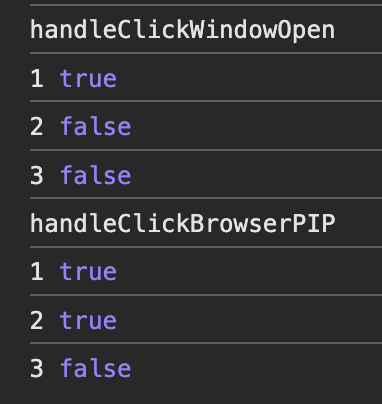
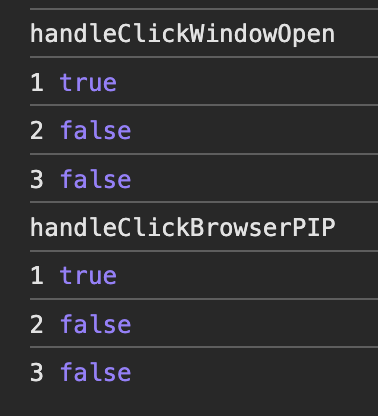
실험 결과2
1) 위 스샷은 같은 코드를 돌린 실험 결과이다. 하지만, requestPictureInPicture 2번째 결과가 눈에 띄게 다르다. (수십번 돌려봄)
- 우선 window.open 함수는 Transient activation-consuming APIs로써 즉시 소비한다.
- requestPictureInPicture는 Transient activation-gated APIs로써 즉시 소비하지 않는다.
- 대신 비동기 함수로 실행이 완료되는 시점에 따라 타이밍적으로 Transition Activation이 만료될 수 있다.
2) 그래서 (window.open > requestPictureInPicture)는 아예 실패했고, (requestPictureInPicture > window.open) 는 성공할 수도 있는 거였다. 하지만, 이 만료 시점은 브라우저 정책마다 달라서 웬만하면 Transition Activation API 끼리는 동시에 호출하지 않는게 좋겠다.
참고 자료
https://ko.javascript.info/popup-windows#ref-267
https://html.spec.whatwg.org/multipage/interaction.html#the-useractivation-interface
- hasBeenActive: StickyActivation (task 내 user-gesture 가 있었는지)
- isActive: Transient Activation (user-gesture 가 여전히 유효한지)
'1️⃣ 개발 지식 A+ > FE' 카테고리의 다른 글
| JWT 기반 클라이언트 인증 (0) | 2025.01.08 |
|---|---|
| 브라우저 캐시 (0) | 2025.01.07 |
| 브라우저 렌더링에서 메인 쓰레드 역할 (0) | 2024.12.23 |
| Web 3D rendering (0) | 2023.09.28 |
| [JS] 비동기 동작 스케줄링 방법 3가지 (0) | 2020.12.22 |


